Category: Video

Responsive Inspector (beta) released!

  • Facebook
  • Twitter
  • DZone
  • LinkedIn
  • Email

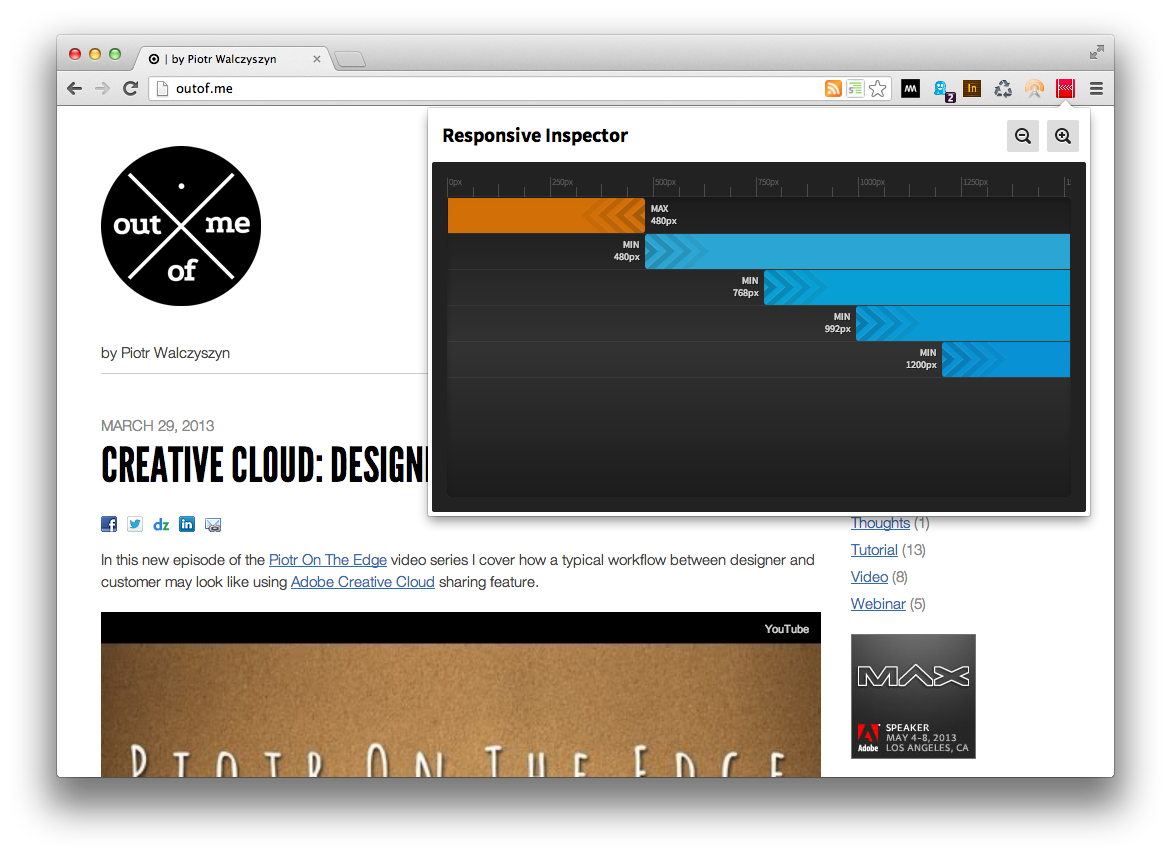
Responsive Inspector logoI’m really proud to announce a beta release of Responsive Inspector extension for the Google Chrome browser. It’s a little side project that I’ve been working on together with Filip Łysyszyn - a colleague from Adobe and a great UI/UX designer. In a nutshell, Responsive Inspector allows viewing defined media queries of visited websites. It is very useful when developing responsive web layouts as it can show what min-width or max-width media queries are specified in CSS stylesheets. In addition it also enables pixel perfect browser resizing, taking and saving whole page screenshots, CSS media query code viewing, and sharing web designs on Behance service as Work In Progress.

You can find it here in the Chrome Web Store. Remember it is a beta release, so if you find any bugs or you would like to share your feedback with us you can use this contact form. Below you will find a screen shot of Responsive Inspector in action and a short video with an overview of all of its features.

Responsive Inspector screen shot

Edge Animate – DPS Integration

  • Facebook
  • Twitter
  • DZone
  • LinkedIn
  • Email

In this new episode of the Piotr On The Edge video series I demonstrate how you can integrate HTML5 animations built using Adobe Edge Animate with DPS-based (Digital Publishing Suite) magazines.

The following topics are covered:

  • A quick intro to Edge Animate
  • Adding DPS navigable links in Animate – using navto:// technique
  • Publishing animations for DPS
  • Placing animation in InDesign/DPS
  • Previewing the article on a device using Adobe Content Viewer

Video Tutorial – Animating Over A Curved Path with Edge Animate

  • Facebook
  • Twitter
  • DZone
  • LinkedIn
  • Email

Last night I did a deep dive webinar on Edge Animate at Adobe TechLive (you will be able to watch it here soon). During the session I covered how you can animate HTML elements over a curved motion path. I haven’t found a really good explanation of this topic in other places so I thought I would record my approach to it and share it with others!

Winter sports with Edge Animate

  • Facebook
  • Twitter
  • DZone
  • LinkedIn
  • Email

Winter sports season has begun for good (at least in my region ;) ) and I thought it would be nice to see how Edge Animate can help us express our hobbies. So what you see below was entirely built with HTML5/JavaScript using Animate and Illustrator ;) If you want to learn how to do it yourself please join my “HTML Animation with Edge Animate” online session during the Create the Web live event next Tuesday (January 15, 2013 @ 1:00 PM EST – 4:00 PM EST).

The Create The Web online event is part of new initiative from the Adobe Evangelism team called Adobe Tech Live. The event is a replay of a world wide tour that was held by Adobe at the end of 2012. So if you missed it nearby, please join us on January 15:

  • 1:00PM – 1:30PM EST: Web Standards and the Future of CSS by Alan Greenblatt
  • 1:30PM – 2:00PM EST: HTML Animation with Edge Animate by Piotr Walczyszyn
  • 2:00PM – 2:30PM EST: Responsive Design with Edge Reflow and Edge Inspect by Holly Schinsky
  • 2:30PM – 3:30PM EST: Mobile and Web Application Development with PhoneGap Build and Edge Code by Ray Camden
  • 3:30PM – 4:00PM EST: Q&A by Everyone

PhoneGap and Force.com in 69 minutes

  • Facebook
  • Twitter
  • DZone
  • LinkedIn
  • Email

I’m proud to present a series of seven video tutorials that teach how to build PhoneGap applications connected to Force.com (Salesforce). It is over an hour of content that goes step-by-step from project set up to packaging of applications ready for multiple platforms.
Continue reading

PhoneGap 2.0 – Getting Started

  • Facebook
  • Twitter
  • DZone
  • LinkedIn
  • Email

As you may already know PhoneGap 2.0 was released last Friday. This is a major release that brings some new features and lots of changes around the way you create and setup your development environment. For example to create a new iOS/PhoneGap project you don’t use a wizard from Xcode anymore; now you need to launch a bash script from command line. Below you will find two short video tutorials that demonstrate how to get started for both Android and iOS platforms. Also after the videos you can find some additional steps that I had to go through in order to get everything running properly. I know these steps may not be necessary for all. I’ve tested it also on my colleague’s less polluted Mac and everything worked out of the box ;)
Continue reading

HTML5 for App Developers: PhoneGap Build

  • Facebook
  • Twitter
  • DZone
  • LinkedIn
  • Email

Below you can find a short video tutorial on how to quickly get up and running with the PhoneGap Build service. PhoneGap Build allows you to compile and package your PhoneGap/Cordova apps for different platforms using an online service. This is especially useful when you are doing iOS development and you don’t have access to a Mac machine and Xcode. The same thing also applies if you would want to publish your app to Windows Phone devices and you are not a PC gal or guy ;)
Continue reading

Intro to BackStack a Backbone.js views navigation library

  • Facebook
  • Twitter
  • DZone
  • LinkedIn
  • Email

Recently I’ve been working on several projects using PhoneGap/Cordova. These projects had a common requirement, and that was to have a custom UI look while preserving the interactions and feel that are common to mobile devices. Because of the custom UI look requirement I didn’t want to use any of the available mobile UI frameworks like jQuery Mobile, Sencha Touch, or jQTouch. Of course, those frameworks are really great and can save you ton of work, but at the same time they come with their own look-and-feel that often can be hard to re-skin to achieve what the app designer has proposed. That is why I decided to stick with pure HTML/CSS elements as much as possible and in some cases to build missing components from scratch. That is how BackStack came to life. In few simple words BackStack is an extension for Backbone.js that allows you to navigate between app views with nice mobile-style slide transitions, fade transitions, and no-effect transitions.
Continue reading