Chrome Extension + Retina + captureVisibleTab + translate3d = 2 x res

  • Facebook
  • Twitter
  • DZone
  • LinkedIn
  • Email

As you may know, recently I’ve been dealing with Chrome Extensions and their APIs quite a bit. This is because I’ve been working on my Responsive Inspector tool. (If you haven’t seen it yet and you are into Responsive Web Designs I recommend you check it out!) Overall I had a great experience with the Chrome Extensions API, except for just one function that really gave me a hard time. This function is captureVisibleTab, which is a key to whole page screen shots feature that I implemented in Responsive Inspector.

The issue I experienced with it was that on some sites the captured screen shots had double the normal resolution. This was only happening on my MacBook with Retina display, and not on every site. On the sites that had this issue, I started isolating the problem element by element and I discovered that the root cause was a translate3d transformation. To work around this problem I included a div element with transform: translate3d(0,0,0) in a page that embeds in an iframe the captured site so that every screen shot had doubled resolution no matter if it used translate3d or not.

Next I called canvasContext.scale(1/window.devicePixelRatio, 1/window.devicePixelRatio) on the Canvas Context that I drew captured image into. This scaled screen shot to proper resolution, and the latest version of Responsive Inspector (now available in Chrome Web Store) runs like a charm on Retina MacBooks :)

Responsive Inspector (beta) released!

  • Facebook
  • Twitter
  • DZone
  • LinkedIn
  • Email

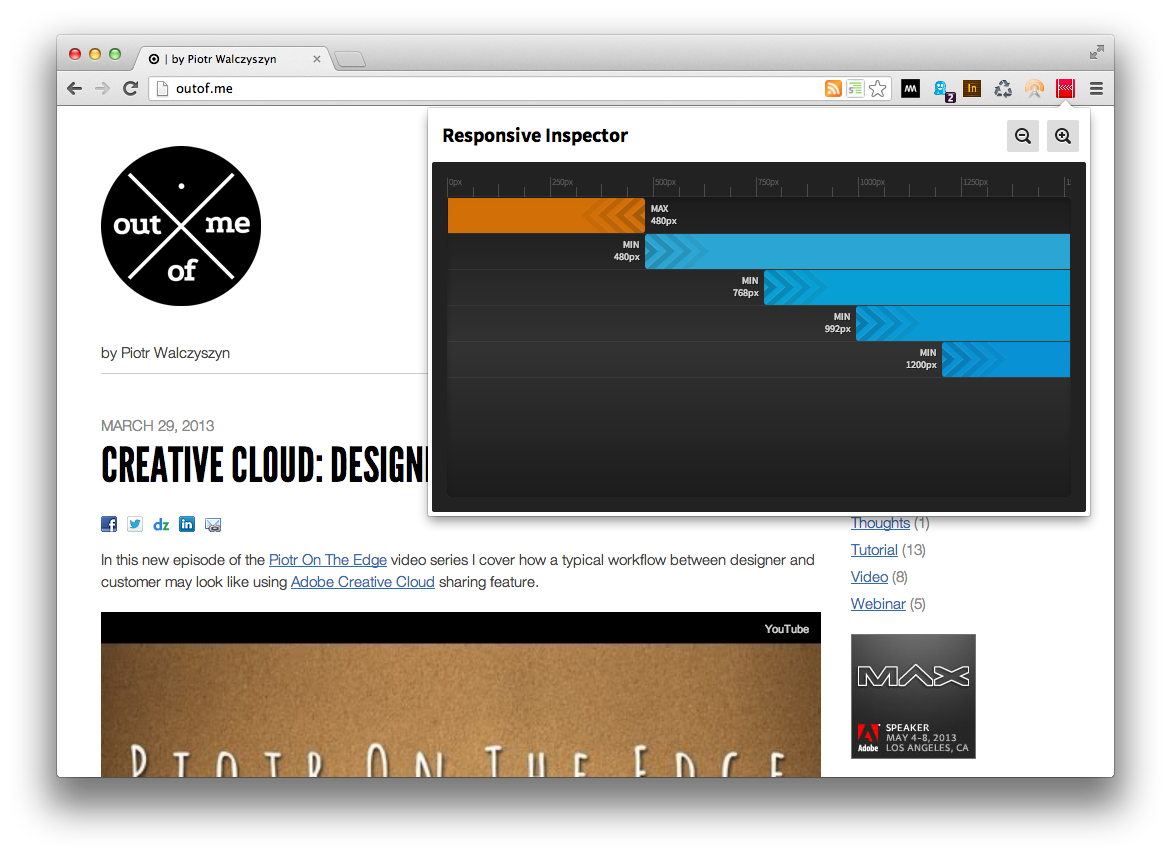
Responsive Inspector logoI’m really proud to announce a beta release of Responsive Inspector extension for the Google Chrome browser. It’s a little side project that I’ve been working on together with Filip Łysyszyn - a colleague from Adobe and a great UI/UX designer. In a nutshell, Responsive Inspector allows viewing defined media queries of visited websites. It is very useful when developing responsive web layouts as it can show what min-width or max-width media queries are specified in CSS stylesheets. In addition it also enables pixel perfect browser resizing, taking and saving whole page screenshots, CSS media query code viewing, and sharing web designs on Behance service as Work In Progress.

You can find it here in the Chrome Web Store. Remember it is a beta release, so if you find any bugs or you would like to share your feedback with us you can use this contact form. Below you will find a screen shot of Responsive Inspector in action and a short video with an overview of all of its features.

Responsive Inspector screen shot

Edge Animate – DPS Integration

  • Facebook
  • Twitter
  • DZone
  • LinkedIn
  • Email

In this new episode of the Piotr On The Edge video series I demonstrate how you can integrate HTML5 animations built using Adobe Edge Animate with DPS-based (Digital Publishing Suite) magazines.

The following topics are covered:

  • A quick intro to Edge Animate
  • Adding DPS navigable links in Animate – using navto:// technique
  • Publishing animations for DPS
  • Placing animation in InDesign/DPS
  • Previewing the article on a device using Adobe Content Viewer

Edge Animate Webinar Banner

Webinar Recording: In-Depth Adobe Edge Animate

  • Facebook
  • Twitter
  • DZone
  • LinkedIn
  • Email

Last week I did an in-depth webinar on Edge Animate. If you are looking for a good getting started resource I believe this can be the one ;)  During this session I covered  the following topics:

• Setting up a new project
• Importing existing HTML content
• Walking through the main panels and tools of Edge Animate
• Animating elements with and without the Pin tool
• Creating and understanding Symbols
• Accessing JavaScript APIs from Actions and Triggers
• Using web fonts with Edge Animate
• Designing for flexible/responsive layouts
• Handling old unsupported browsers
• Publishing and Optimizing Edge Animate compositions for the Web and DPS (Digital Publishing Suite)

You can watch the whole webinar here.

Video Tutorial – Animating Over A Curved Path with Edge Animate

  • Facebook
  • Twitter
  • DZone
  • LinkedIn
  • Email

Last night I did a deep dive webinar on Edge Animate at Adobe TechLive (you will be able to watch it here soon). During the session I covered how you can animate HTML elements over a curved motion path. I haven’t found a really good explanation of this topic in other places so I thought I would record my approach to it and share it with others!

Winter sports with Edge Animate

  • Facebook
  • Twitter
  • DZone
  • LinkedIn
  • Email

Winter sports season has begun for good (at least in my region ;) ) and I thought it would be nice to see how Edge Animate can help us express our hobbies. So what you see below was entirely built with HTML5/JavaScript using Animate and Illustrator ;) If you want to learn how to do it yourself please join my “HTML Animation with Edge Animate” online session during the Create the Web live event next Tuesday (January 15, 2013 @ 1:00 PM EST – 4:00 PM EST).

The Create The Web online event is part of new initiative from the Adobe Evangelism team called Adobe Tech Live. The event is a replay of a world wide tour that was held by Adobe at the end of 2012. So if you missed it nearby, please join us on January 15:

  • 1:00PM – 1:30PM EST: Web Standards and the Future of CSS by Alan Greenblatt
  • 1:30PM – 2:00PM EST: HTML Animation with Edge Animate by Piotr Walczyszyn
  • 2:00PM – 2:30PM EST: Responsive Design with Edge Reflow and Edge Inspect by Holly Schinsky
  • 2:30PM – 3:30PM EST: Mobile and Web Application Development with PhoneGap Build and Edge Code by Ray Camden
  • 3:30PM – 4:00PM EST: Q&A by Everyone

Creating End Of The World Timer with Edge Animate

  • Facebook
  • Twitter
  • DZone
  • LinkedIn
  • Email


Attend today’s Create The Web online sessions and learn how to create your own end of the world timer with Adobe Edge Animate. There is not much time left. The Edge Animate webinar starts at 19:30 CET and the end of the world is tomorrow at 10:11 CET ;)

By the way, today’s online event is the first one under the umbrella of our new initiative called Adobe TechLive. In the future, our Evangelism team is planning to use this new channel to host online webinars like this one, in-depth online workshops, interactive chats with Adobe Product Managers and I guess potentially anyone that would like to share valuable content around the web technologies.

UPDATE (2012-12-21): I guess end of the world didn’t happen so in this case it really makes sense to learn Edge Animate, you can watch my session at the 31:45 minute mark here.